
MixHub AI — Detailed Introduction
MixHub AI is a web‑based, multi‑model AI platform that centralizes state‑of‑the‑art models for chat, image, and video generation. It exposes a unified interface for creators, marketers, and developers to produce high‑quality multimedia using text prompts or uploaded assets, without local compute requirements.
Key technical features
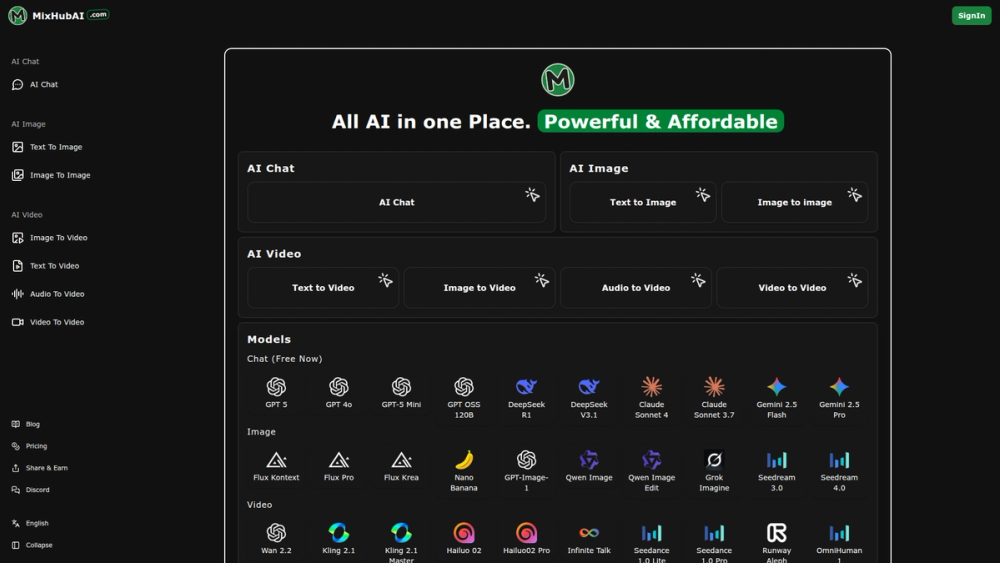
- Multi‑model orchestration: integrates many specialized models (e.g., Runway, Hailuo, Kling, Seedream 4.0, Seedance, Gemini, GPT‑series, Claude, DeepSeek, Flux, Nano Banana, Qwen, Grok) and allows users to select the best engine for a given task.
- Multi‑modal generation: supports text→image, text→video, image→image, image→video, audio→video and video→video pipelines.
- Cloud parallel processing: leverages cloud GPU/TPU backends and parallel model execution to speed generation and scale throughput for multiple concurrent jobs.
- Quality enhancement tools: AI upscaling, face editing, denoising, style transfer, and post‑processing filters to improve fidelity and reduce artifacts.
- Web‑native UX with responsive client: browser‑first design (no app install) and mobile‑responsive controls for prompt input, asset upload, and previews.
- Model discovery and switching: browse and sample dozens of AI models with thumbnails and quick links to model detail pages.
- Community & support: integrated links to Discord, blog articles for prompts, tutorials, and developer contact.
Use cases and practical applications
- Short‑form video production: marketers and social creators can generate on‑brand promotional videos using text prompts and selected video models.
- Concept art and design: artists can create image variations, perform image→image transformations, or produce high‑resolution assets for storyboards.
- Rapid prototyping: product teams and UX designers can mock up animated interfaces or explainer clips quickly.
- Content localization and repurposing: convert audio or images into localized videos or create multiple stylistic versions efficiently.
- Educational and training materials: instructors can create visual aids, animated demonstrations, and example datasets.
- Developer experimentation: engineers and researchers can compare outputs from different models and tune prompts for production workflows.
Unique selling points
- Aggregated access to many premium models and toolchains in a single browser UI.
- No local hardware required; generation happens in the cloud with attention to speed and scalability.
- Easy onboarding: one‑click generation workflows, clear model selection, and prebuilt modes for common creative tasks.


